

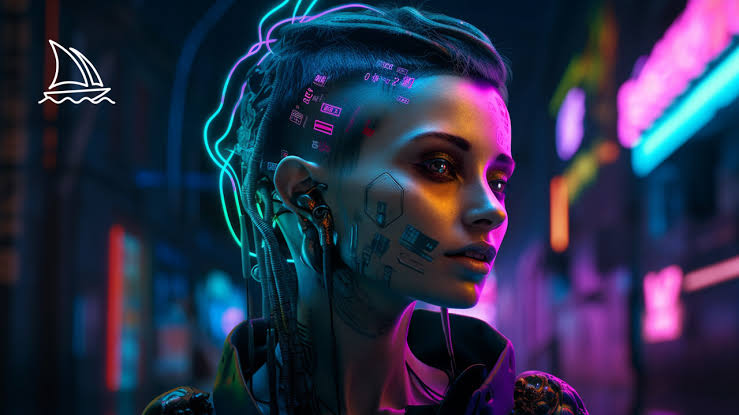
Artificial intelligence has changed the way people approach visual content. Instead of spending hours drawing, modeling, or searching through stock libraries, creators can now describe an idea in natural language and receive an original image based on that description. This technology is commonly known as text-to-image generation, and it has become useful for designers, marketers, writers, educators, and creative professionals.
Among the best-known platforms in this space is Midjourney, which demonstrates how written instructions can be transformed into detailed visual concepts. Understanding how this process works can help users create better prompts and achieve more consistent results.
From words to visual concepts
At a basic level, an AI image generator interprets the meaning of a written prompt and converts that information into visual characteristics. A prompt might describe a person, location, object, atmosphere, lighting style, color palette, or artistic direction.
For example, a simple prompt such as “a small cabin beside a snowy mountain lake at sunrise” contains several visual elements. The AI needs to determine how those elements relate to one another and construct an image that represents the overall concept.
Modern image-generation systems are trained using large collections of images and associated descriptions. During training, the system learns relationships between language and visual patterns. When a user enters a prompt, the model uses those learned relationships to generate a new visual composition.
Why prompt writing matters
The quality of an AI-generated image depends heavily on how clearly the user communicates the desired result. A vague prompt can produce an interesting image, but it may not match the intended concept.
A more structured prompt can include:
- Subject: What should appear in the image?
- Environment: Where is the subject located?
- Composition: How should the elements be arranged?
- Lighting: Should the scene be bright, dramatic, soft, or cinematic?
- Color: What colors or overall palette should dominate?
- Style: Should the image look photographic, illustrated, futuristic, minimalist, or painterly?
- Mood: Should the result feel peaceful, mysterious, energetic, or nostalgic?
For instance, instead of requesting “a futuristic city,” a creator could describe “a futuristic city at night, viewed from street level, with illuminated glass towers, reflective streets after rain, atmospheric fog, and cinematic blue-and-orange lighting.” The additional information gives the model more visual direction.
How an image generator interprets a prompt
Although the underlying technology is complex, the process can be understood through a simplified sequence.
First, the system analyzes the text and identifies important concepts and relationships. It then maps those concepts into an internal representation that connects language with visual information.
The generation process begins with an initial noisy representation. Through repeated computational steps, the model gradually moves toward an image that corresponds to the requested concepts. The final result is not simply a picture retrieved from a database. Instead, the system generates a new composition based on patterns it learned during training.
This is why small changes in wording can sometimes produce significantly different results.
Experimentation is part of the process
AI image generation is rarely a one-prompt activity. Creators often generate several versions, identify what works, and then modify the prompt.
For example, if a character looks correct but the background is too busy, the next prompt can emphasize a simpler environment. If the lighting is too dark, the creator can request brighter or softer illumination. If the composition feels too distant, the prompt can specify a close-up or portrait perspective.
This iterative approach is similar to traditional creative work. Instead of adjusting a drawing manually, the creator communicates changes through language and evaluates each new generation.
Practical tips for better results
When working with an AI image generator, clarity is usually more useful than adding random descriptive words. Start with the most important elements and gradually introduce additional details.
It can also help to avoid contradictory instructions. Asking for a minimalist composition while simultaneously requesting dozens of prominent objects may create an unpredictable result.
Another useful technique is to describe the relationship between elements rather than simply listing them. For example, saying that “a cyclist rides along a narrow coastal road with cliffs on one side and the ocean on the other” provides compositional context that a simple list of “cyclist, road, cliffs, ocean” does not.
Creators should also experiment with different levels of specificity. A short prompt can provide creative freedom, while a detailed prompt can offer greater control over the intended concept.
Using AI-generated visuals responsibly
The growing popularity of AI-generated images also creates important questions about copyright, commercial use, attribution, and the use of training data. Anyone using generated visuals for professional or commercial purposes should understand the platform’s current terms and applicable laws.
It is also important to be transparent when AI-generated imagery could reasonably be mistaken for documentary photography or authentic evidence. Creative experimentation is one thing; presenting synthetic imagery as a real event is another.
The bigger role of AI in visual creativity
Tools such as Midjourney illustrate a broader shift in creative technology. The ability to describe an image instead of manually constructing every visual element lowers the technical barrier to experimentation.
This does not necessarily eliminate the need for human creativity. Instead, it changes where that creativity is applied. Users can focus more on developing concepts, choosing visual directions, refining compositions, and communicating ideas.
For beginners, the most effective approach is to treat AI image generation as an iterative creative process. Start with a clear concept, write a focused prompt, review the result, and refine the instructions based on what the image gets right or wrong.
As these systems continue to improve, the ability to translate language into visual concepts will become increasingly useful across advertising, entertainment, education, product development, social media, and many other fields.
