

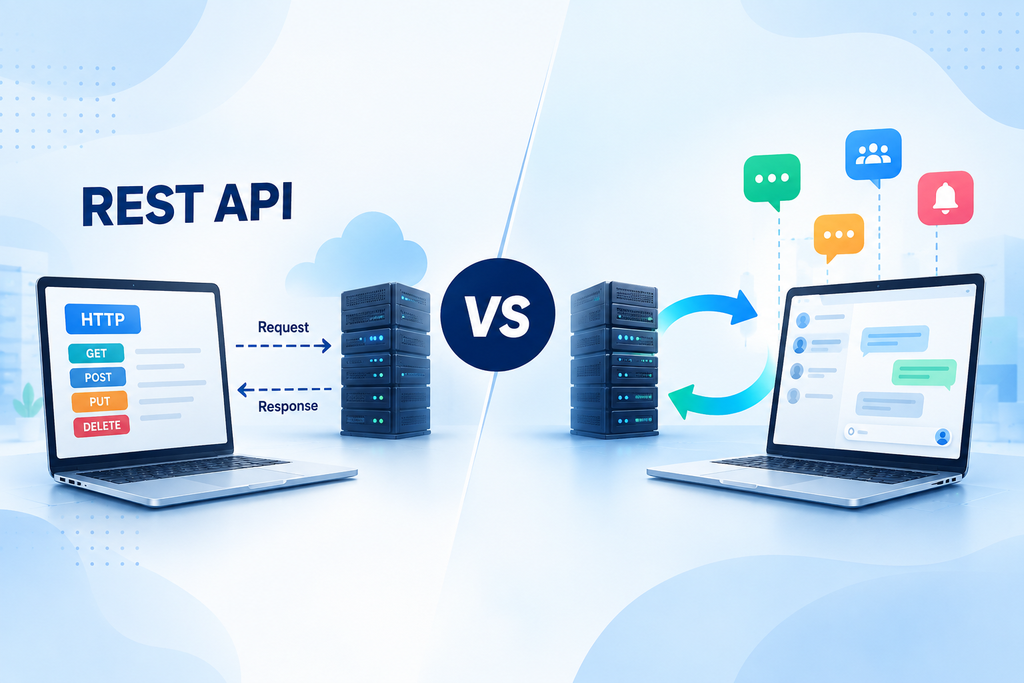
Use a REST API when your application mainly needs a standard request-response operation, such as authentication, data retrieval or record updates. Use WebSockets when the application needs persistent, low-latency, bi-directional communication such as chat, live notifications, presence, or collaborative updates. In many real-world applications, I use both, as they solve different parts of the tech product communication problem. The right choice comes down to the communication model, latency, complexity and whether the server needs to be updated instantly.
REST APIs and WebSockets both connect clients and servers, but they work in very different ways. I will share my insights on their communication models, real time capabilities, practical use cases and when each approach makes more sense.
What Is a REST API?
A REST API is based on the HTTP Request-Response model.
The client sends a request, the server processes it, and returns a response. If the client requests updated data again later, it typically must send another request.
It works well for typical application operations like:
• User authentication
• Fetching user profiles
• Retrieving product data
• Creating or updating records
• Loading message history
When the application does NOT require a persistent connection, I would typically prefer using REST. It is simple, widely supported and suitable for an operation occurring only when the client wants it to.
What Is WebSocket?
WebSocket creates a continuous connection between the client and server.
After this connection is established, both parties can exchange data without establishing a new HTTP request every time. What’s more important, the server can push updates immediately when something changes.
This makes WebSockets a natural solution for real-time applications.
Typical examples include:
• Chat applications
• Live notifications
• Collaborative tools
• Multiplayer games
• Live dashboards
Its persistent connection is a key factor that makes it different from REST API. It lets the data flow without waiting for the next request from the client.
WebSocket vs REST API: Key Differences
| Factor | REST API | WebSocket |
| Communication | Request-response | Persistent, bidirectional |
| Request per connection | Individual HTTP request | Persistent connection |
| Server push | Not native | Supported |
| Updates in real-time | Requires additional approach | Built for real-time communication |
| Complexity | Generally simpler | Needs connections management |
| Most appropriate for | Standard application operations | Continuous/ live updates |
| Examples | CRUD, authentication and data retrieval | Chat API, live updates, collaboration |
The biggest difference between REST and WebSocket API is who can start the exchange. In REST, the client asks first. With WebSocket, either party can transmit data once the connection is established.
I have seen that WebSockets are also a good choice for continuous updates. The client can receive a chat message, status change or live event right away.
The trade off is complexity. WebSocket implementations require connection management, reconnection, authentication, scaling, and failure handling. For REST, each request is individual, which makes it generally easy to implement.
When Should You Use REST APIs?
I use REST if the application is primarily a request-response type application.
When you do not need to update data continuously, the primary requirement is CRUD and simplicity is important, REST can be a good fit.
A mobile application could, for instance, use REST to authenticate a user, load his/her profile, get products, update his/her account setting or get previous messages.
If that is the case, it isn’t worth adding the complexity of persistence to the equation.
When to use WebSockets?
I prefer WebSockets when the app needs data as soon as it changes.
That usually means:
• The server must be able to push updates.
• There needs to be ongoing communication.
• Low-latency interaction matters
• Users expect instant feedback
The obvious example of such a use case is real-time chat. When one user sends a message, then the other user should get it instantly.
The same goes for typing indicators, presence updates, multiplayer games, live dashboards, collaborative editing, and instant notifications.
Implementing WebSockets or a higher-level Chat API or SDK like MirrorFly will enable messaging apps to implement real-time functionality without having to implement each messaging component from scratch.
Can REST APIs and WebSockets Work Together?
Yes, and in many applications, this is exactly what happens for a better design.
I often use REST for the following:
• Authentication
• User profiles
• Application data
• Configuration
• Message history
And WebSocket for:
• Real-time messages
• Typing indicators
• Presence
• Live events
• Instant notifications
For example, a chat application could load older messages into the application using REST when the user logs in, and load live messages and other status updates using WebSocket.
The technologies are not mutually exclusive. They just do a better job of certain aspects of the application.
WebSocket vs REST API: Which Should You Choose?
1. When to Choose REST API?
Use REST for regular request-response communication. It will work well if real time updates are not critical and the system primarily fetches or updates data.
2. When to Choose WebSocket
Select WebSocket when you need a persistent connection, push updates and low latency, real time interaction.
3. When to Choose Both
Use both when the application is using basic API operations with real-time operations.
Typical in messaging, collaboration, dashboards and marketplaces, as well as other interactive applications.
Conclusion
I don’t view REST and WebSockets as mutually exclusive communications protocols. REST is good for predictable request-response operations. WebSockets are useful when data should be transferred on-the-fly and continuously.
In reality, the best architecture incorporates elements of both.
The question that I ask is, is this interaction only when the client asks for the data or can the server push an update as soon as something changes?
Once that is clear, the decision between WebSocket vs REST API becomes much easier.
