

Have you been contemplating whether or not Wondershare Filmora is safe enough for your personal computer, but can’t seem to find anything concrete? Don’t worry! I’ve gone through my fair share of trouble while installing this software, so let me tell you everything there is to know before making a decision.
Is Filmora Safe?
Filmora does not contain any viruses, so you don’t need to worry about it when downloading it. It is also safe for your device and will not affect your privacy in anyway if you download from the Filmora website.

I have personally used Filmora for over two years and never had any safety or security issues. Furthermore, this video editor was created by Wondershare, who has been in business since 2003- an established international software company.

More than 17 years of providing simple and convenient software to millions of users in over 150 countries has only enhanced their reputation as a trustworthy company. Besides that, many well-known YouTubers like Justin Brown, Daniel Batal, and so forth are also using Filmora for video editing purposes.
In addition to these factors, Wondershare Filmora also has a strong following on social media. They have over 630,000 subscribers on their YouTube channel and 380k+ followers on Facebook- both of which are indicative of an excellent reputation with the community.

Considering the various factors (as well as my own personal experience), I can safely say that Filmora is a perfectly safe video editor, perfect for beginners or those who are intermediate level.
Is Filmora a Virus?
Filmora is not a virus, nor does it contain any malware that can harm your device or take away your sensitive information. To confirm this and to make sure there are no viruses involved, I will perform a scan of both the installer as well as the program itself when it has been installed onto my computer.
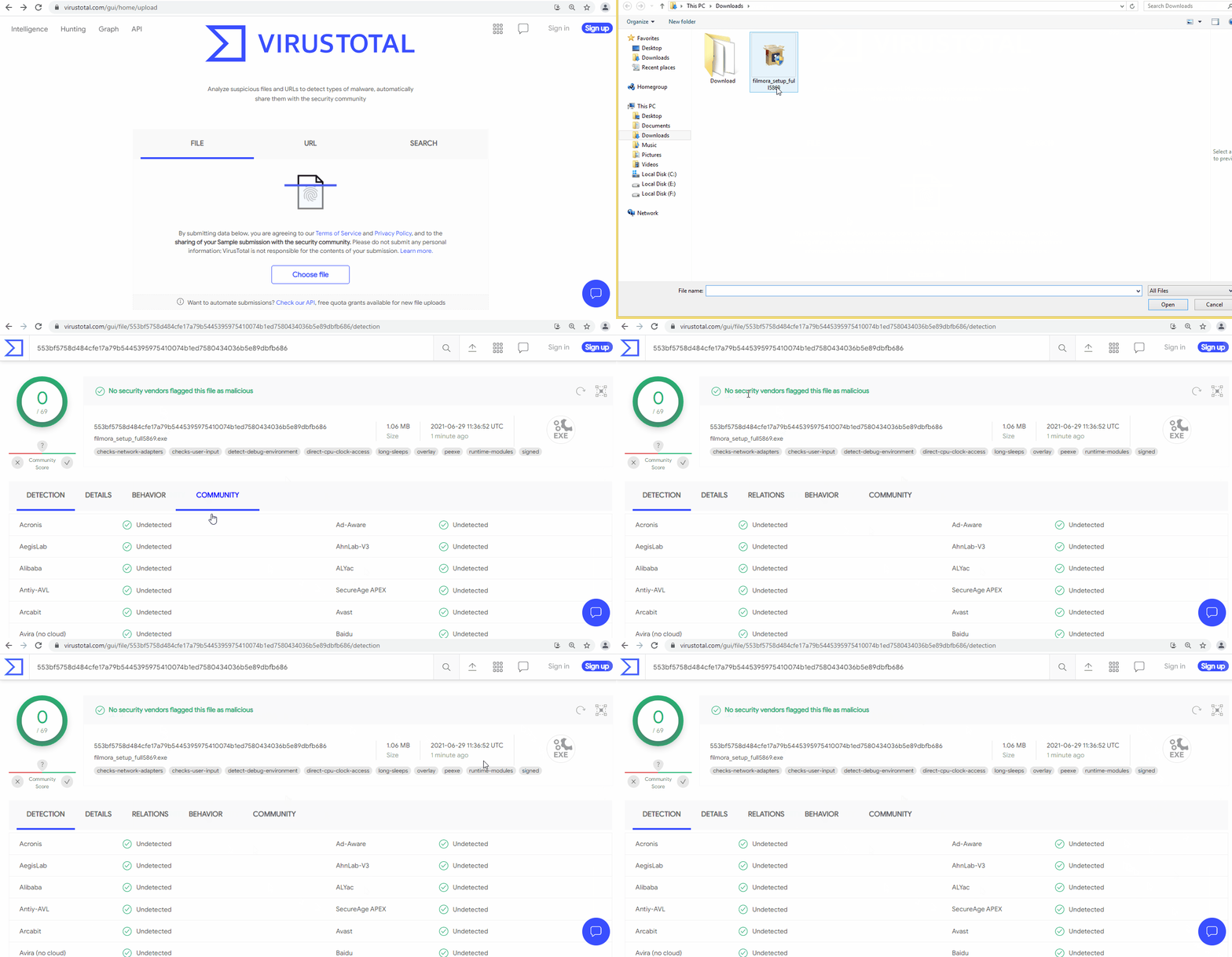
First, we need to use VirusTotal to scan the installer file of Filmora and analyze any suspicious content using Bitdefender’s premium version, one of the best antivirus programs available.
Here are the virus scan results when it was scanned with VirusTotal:
And here are the results when scanned with Bitdefender:
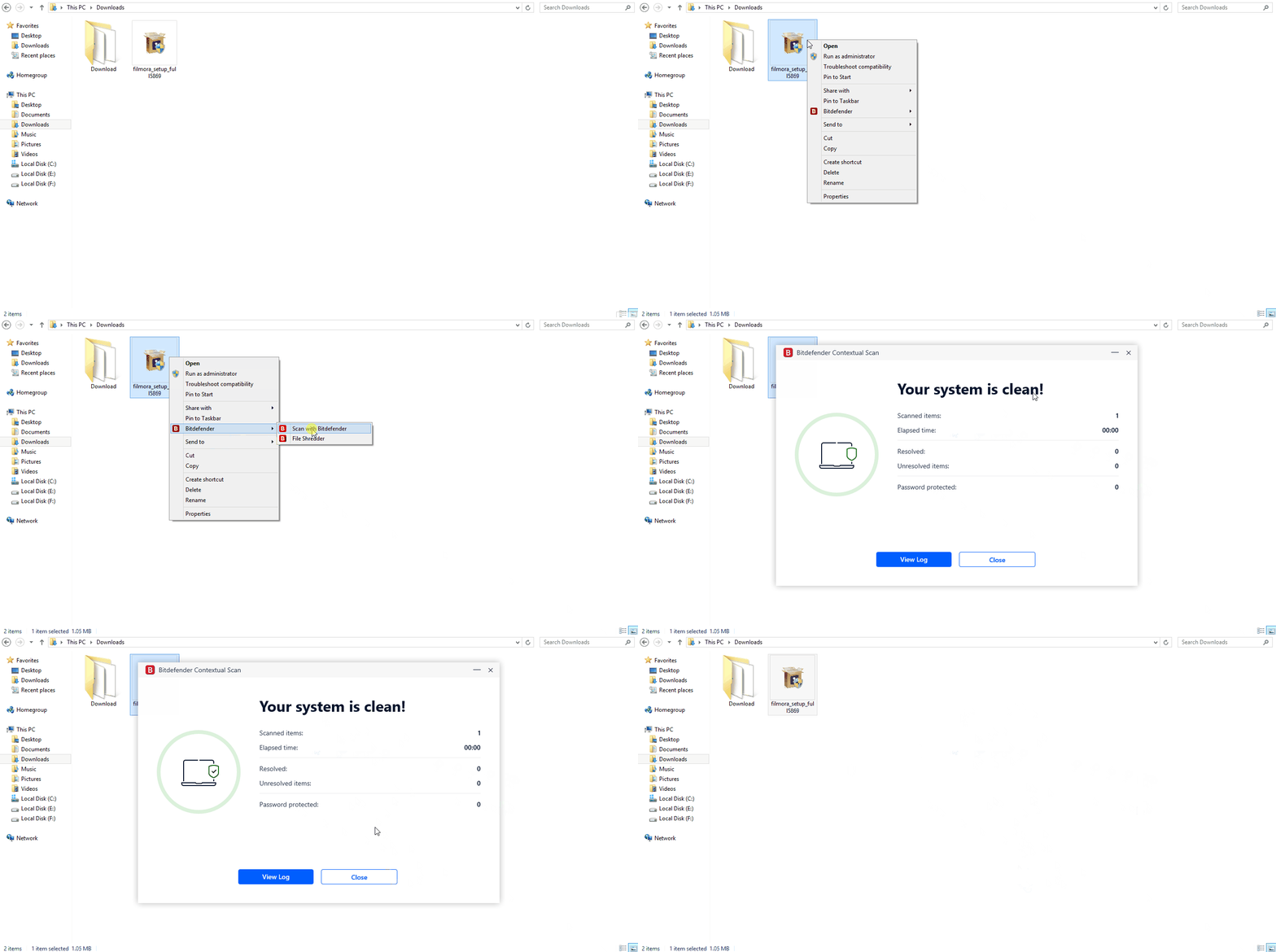
Now, let’s run the Bitdefender antivirus scan on Filmora and see what it found!
Not just Bitdefender, but other prominent antivirus software such as McAfee, Norton, AVG has also confirmed that the installer and installed program are free of viruses. It is safe to say without a doubt that they are virus-free and do not contain any malicious code or infected files.
Is Purchasing From Wondershare Secure?
As far as I know, purchasing from Wondershare is completely safe. Your personal information is encrypted using Secure Trust Technologies when you purchase through the website, an internationally recognized brand for cyber security and data protection.

Apart from that, all your financial and personal information is securely encrypted with the most advanced technology out there. To verify whether Wondershare has secure encryption measures, I scanned the site with Qualys’ SSL Labs – a free, trusted online service that performs a detailed analysis of SSL web servers on the public internet.
As you can see, it received an A+ rating verifying that they are meeting the highest standards of security.

Furthermore, I scanned Wondershare website with Securi for viruses, malware, blacklisting status, malicious code, website errors, out-of-date software and came up with nothing. Take a look at this screengrab below – it’s all clear here:

As I did research online, there were no complains about Wondershare’s payments or privacy policy. They seem to be very reliable and trustworthy; so purchasing from them will most likely turn out okay.
Will You Keep Getting Annoying Ads Continuously Even After Uninstalling Filmora?
Before writing this guide, I was and still am pretty sure that Filmora is definitely a safe video editor because of my personal experience with it. However, some people were complaining about continuous ads from Wondershare when they had uninstalled the app.

Arslan, is it really true?
I removed Filmora for 2 weeks to see if there were any possible harmful side effects when the program was uninstalled, but it turns out they weren’t true.
In those two weeks I didn’t receive a single unwanted advertisement from Wondershare.
When I checked Bitdefender, it did not find anything suspicious or harmful. Unsurprisingly, when uninstalling any of Wondershare’s products there is an advertisement for discounted software.
This ad appears one time after the uninstallation.

This is just their sales tactic and it’s common for most companies to offer discounts on goods when you’re about to stop using their product. Also, that complaint on Reddit from 8 years ago might be exaggerated – because if the person really did get ad-spammed continually then there would have been others who agreed with him in the comments since he had an inadequate grievance.
It is important to mention that this statement is incorrect. You will not receive continuous advertisements from Wondershare if you uninstall it.
Do I recommend Filmora?
Yes, I do recommend Filmora for beginners or mid-level video editors who are just starting out and want an easy to use and affordable video editor that will allow them to create great videos in a quick amount of time without being overwhelmed with all the features and controls.
It’s got tonnes of built-in filters, colouring tools, clip art, and music to choose from – all of which work together so well to make life as a beginner or intermediate editor just that little bit easier.
However, Filmora isn’t the best option for people looking to edit professional videos because it doesn’t offer enough features and customization options for more experienced editors.
For those who want to edit videos professionally, I suggest using Adobe Premiere Pro.
Conclusion
Based on my own experience with Filmora, the available data, and the in-depth testing I conducted for this article, I am confident in saying that Filmora is a safe and trustworthy video editing program. However, here are some tips to keep in mind:
- Do not use Filmora with a cracked program.
- Never use pirated or shared Filmora license keys because they do not come from the software publisher and you do not have permission to make use of them.
- You should never buy or download Filmora from sites other than the official website because they are most likely counterfeit copies and will cause viruses, data loss, or worse.
- In addition to being safe, it was also secure. Both the software and website were safe from intrusion during testing.
So, yes Filmora is very safe and secure and I highly recommend it for beginners or intermediates in video editing. If there are any remaining doubts about it then I hope they’ve been answered after this article. Just be sure to let us know about any other problems you come across because we want everyone to feel comfortable using our product!
