

In the world of technology, we see a huge collection of applications that are used to change the location of our servers. Location services have become an important part of our digital experiences. There are many chances when you want to change your iPhone or iPad’s GPS location for reasons like privacy, testing applications, or gaming. If you want to change the location for any reason, the GPS location on an iOS device has traditionally required a computer. The computer is not available all the time so that it becomes difficult for you to change the location just using your iOS device. But no need to worry now, if you want to overcome this problem, then you are at the right place. Advancements in technology have led to the development of tools that allow users to change their location without the need for a computer. We are talking about iOS Location changer MocPOGO – Best location changer for Location-based APP/Games. Let us discuss it in more detail.
What is the Best iOS Location Changer in 2024?
Changing the location on an iPhone without a computer poses several challenges, because of Apple’s security measures designed to protect user data and privacy. While the App Store offers many applications claiming to change GPS locations, many of them do not work due to Apple’s restrictions on location manipulation. Firstly discuss why it is difficult to change the location without a computer?
- Apple has implemented security protocols to prevent unauthorized access and manipulation of location data. This includes restricting third-party applications from altering the GPS location directly.
- The App Store guidelines strictly prohibit apps that manipulate or fake GPS locations. As a result, many apps attempting to provide such services are either restricted or removed from the App Store.
- Apple regularly updates its iOS system to patch vulnerabilities and enhance security. This makes it challenging for developers to develop reliable solutions for changing location without a computer.
Here are some limitations for fake GPS Location changer:
Many fake GPS tools fail to bypass Apple’s security measures, rendering them ineffective in changing the device’s location. Some tools may not work seamlessly with popular apps, limiting their practicality for users who want to use location-based features in various applications. Using unreliable or outdated fake GPS tools may lead to device instability, crashes, or other unexpected issues. Because of these challenges, users trying to change their iPhone or iPad’s GPS location without a computer need a solution that can navigate through Apple’s security measures effectively.
But MocPOGO is an amazing iOS location changer in 2024, highlighting its features and advantages that make it a reliable choice for users looking to change their device’s GPS location easily without a computer.
How to Change GPS Location on iPhone without a Computer?
To change your iPhone or iPad’s GPS location using MocPOGO, follow these simple steps:
- Download and Install MocPOGO: Visit MocPOGO’s official website to download and install the application on your iOS device.
- Grant Necessary Permissions: Follow the on-screen instructions to grant the necessary permissions to MocPOGO, ensuring it can effectively alter your device’s location.
- Select Desired Location: Open the MocPOGO app and choose the location you want to simulate on your iPhone or iPad.
- Activate Simulation: Enable the location simulation feature within MocPOGO to instantly change your device’s GPS location.
MocPOGO, providing users with a reliable and efficient solution for altering their iOS device’s location without the need for a computer.
How Does MocPOGO Work?
There are some simple steps that are followed to change iPhone GPS location without computer:
Launch the App:First of all install the aplictaion. After installing MocPOGO for iOS, open the application. The current location will be displayed on the map.

Enter Location You Want: You can either enter the address in the search box to specify the location you want to fake.
Teleport: Once you have selected the desired location, click the “Teleport” button on the map.
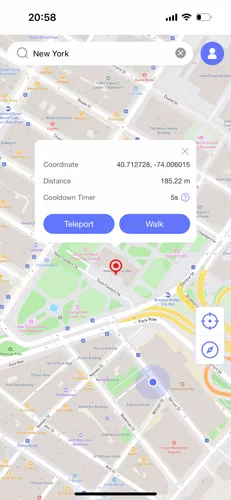
VPN Configuration: MocPOGO for iOS will prompt you to configure a VPN. Click on “Configure VPN” to proceed.

Location Change Success: In a matter of seconds, your iPhone’s location will be changed to the selected spot.

Note: After changing your iOS location, all location-based software on your phone will be localized to the fake location you have set. If you face any issue then visit https://mocpogo.com/guide/how-to-use-mocpogo-for-ios/
Conclusion:
In conclusion, if you are looking to change your iPhone or iPad’s GPS location without any problem of using a computer, MocPOGO is the answer. With its user-friendly interface, compatibility with various apps, and high success rate, MocPOGO is the best choice for users that are finding a reliable and efficient solution. To take full advantage of MocPOGO, consider purchasing the iOS app and enjoy access to the Windows, Mac, and Android versions. Unlock a world of possibilities and explore location-based features on your terms with MocPOGO. Visit MocPOGO’s official website to learn more and make your purchase today.
