


Is It a Good Idea to Do Cloud Backup for Business Data?
As data becomes more decentralized, small business or home office users need backup applications that can protect data wherever it resides. Cloud backup services are playing a bigger role than ever before. There is no doubt that backing up business data to cloud is a good idea.
Not only because cloud backup providers offer various backup features to meet a wide range of customer needs, but also because cloud has become the main data protection service due to its high security, reliability, and convenience.
Free Cloud Backup Service for Backing up Business/Home Data Online
What is the easiest way to create cloud backup for small business or home office data? There is an excellent free online backup utility that can help you named CBackup. It offers CBackup Cloud, with 10GB of free backup space, and you can use it to backup files, folders, hard drives, or entire computers to Google Drive, OneDrive, Dropbox, and more clouds easily. It is an ideal solution to protect your important PC data from loss or damage.

CBackup’s main features
Interactive and simple GUI. The tool makes it easy to backup files to the cloud and you can monitor the progress of file uploads.
Selective backup. It allows you to back up all types of data like documents, PDFs, videos, audio, etc., as well as create local or external disk backup to cloud at will.
Automatic backup. You can perform automatic backup at fixed intervals, such as daily, weekly, or monthly, and it utilizes incremental backups to copy only changed files for saving storage.
Cloud to cloud transfer. In addition to local to cloud backup, it also provides cloud to cloud backup to copy data from one cloud storage to another seamlessly, like transferring Google Drive to Dropbox.
How to Create Cloud Backup for Business and Home Data
Widely compatible with Windows 11, 10, 8.1, 8, 7, and XP PCs, you can get the CBackup program installed on your device and learn how to create cloud backup for your business data with ease.
Step 1. Register for a free CBackup account, and log in to its desktop application.
Step 2. Choose to backup data to public clouds or CBackup according to your needs.
- To backup business data to public clouds like Google Drive/OneDrive/Dropbox:
Click My Storage on the left pane, then choose a cloud drive to add and connect it to CBackup. Then, choose Backup PC to Public Cloud in the Backup window.
- To backup business data to CBackup Cloud:
Head to the Backup page directly, and click on Backup PC to CBackup Cloud.

Step 3. Choose the data you are planning to backup under source, and specify your target cloud. Then, hit Start Backup to do business data cloud backup easily.

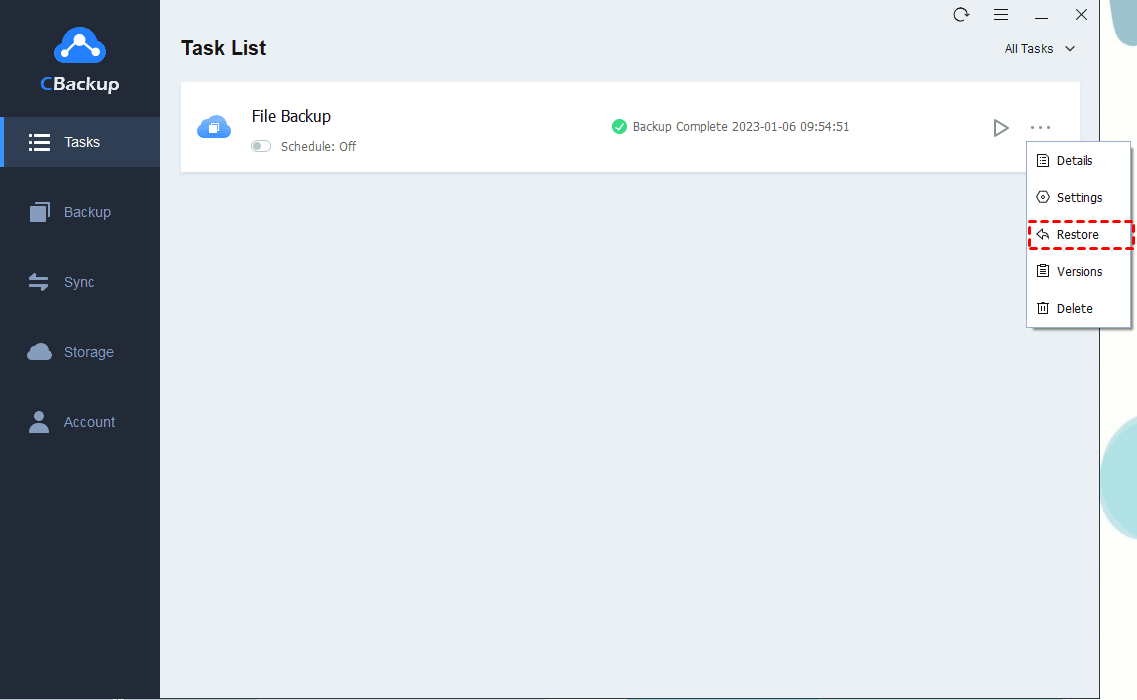
You can restore the cloud backup data whenever you need for free by locating the backup task under Task, click on More > Restore, and follow the on-screen guides to get them back.
FAQs about Backing up Data to Cloud
#1. Which cloud is best for business?
The best cloud storage service for business depends on your specific needs, such as storage capacity, security, and collaboration features. Some top options include:
- OneDrive/OneDrive for Business (excellent for integration with Microsoft Office 365)
- Google Drive (Great for collaboration with Google Workspace)
- Box (strong security and compliance features)
#2. How much does a cloud server cost for a small business?
The cost of cloud storage for a small business can vary widely based on factors such as storage capacity and additional services. On average, the monthly cost ranges from $50 to $1,000.
#3. Is it better to backup to cloud or hard drive?
Cloud storage offers continuous backup, accessibility from anywhere, automatic sync, and protection against physical damage. It is ideal for businesses needing constant access and collaboration. While external hard drive provides a one-time cost solution and can be faster for large data transfers. However, it is vulnerable to physical damage, and theft, and requires manual updates.
So for most small businesses and home office users, cloud storage offers better overall advantages due to its scalability, accessibility, and lower long-term risk.
Summary
Keeping data safe is vital for every business and home. Choosing the right cloud backup tool protects data security and facilitates data management. With CBackup as your data backup solution, you get a flexible cloud backup solution and ensure a high level of data security. In addition, its advanced data transfer and versioning features help you manage your data easily.
